Introduction
I was staring at a client’s final cut when I noticed the faint Hailuo AI logo pulsing in the corner. The “free” tool had watermarked every clip. That moment pushed me to ditch any tool that watermarks output and build a stack of genuinely free, clean-export generators.
Most “free” AI video generators are bait. You sign up, generate a clip, and then realize you can’t use it anywhere. The watermark is baked in, and the resolution is too low for even a TikTok. That’s not free. That’s a demo. For a US creator trying to publish daily, that’s a dealbreaker.
Key Takeaways
- Only three tools, Seedance 2.0, Magic Hour, and Pika AI, deliver genuinely watermark-free exports on their ongoing free plans as of July 2026.
- Most “free” AI video generators, including Hailuo AI, Kling AI, PixVerse, and Luma Dream Machine, watermark output and cap resolution at 768p or below, making them unusable for professional work.
- Combining multiple free tools with a free editor like CapCut lets you produce professional-grade videos without spending a dime.
- Daily credit stacking across tools builds a usable stock footage library over time. Log in every day, even when you don’t need clips.
- Free tier policies change without warning; bookmark pricing pages and re-verify monthly.
This guide cuts through the noise. I’ve tested every tool that claims to be free, and only three actually deliver clean, watermark-free exports on their ongoing free plans: Seedance 2.0, Magic Hour, and Pika AI. You don’t need a credit card or a subscription to start. You just need a strategy to stack daily credits across these tools and a free editor like CapCut.
Quick Comparison Table: Free AI Video Generators at a Glance
Before diving into detailed reviews, here’s the at-a-glance comparison so you can see which tools actually deliver clean exports. The real sleeper here is Magic Hour’s credit system. We ignored it for weeks because 400 credits sounded stingy, but those credits never expire. We came back to a half‑finished project a month later and picked up right where we left off, no daily reset anxiety. The table below cuts through the marketing noise.
| Tool | Free Tier Type | Credits (Daily/Monthly) | Max Resolution | Watermark? | Credit Card Required? | Best For |
|---|---|---|---|---|---|---|
| Seedance 2.0 | Ongoing free | 100 daily | 1080p | No | No | Clean, high‑res exports |
| Hailuo (MiniMax) | Ongoing free | ~3 clips/day | 768p | Yes | No | Volume testing |
| Kling AI 3.0 | Ongoing free | 66 daily | 720p | Yes | No | Realistic clips (watermarked) |
| PixVerse | Ongoing free | 90 one‑time + 60 daily | 540p | Yes | No | Quick experiments |
| Luma Dream Machine | Ongoing free | 80 daily | 720p | Yes | No | High daily output |
| Magic Hour | Free plan (credits don’t expire) | 400 (no expiry) | Not specified | No | No | Occasional watermark‑free use |
| Pika AI | Free plan | Not specified | Not specified | No | No | Simple watermark‑free clips |
Last verified: July 25, 2026
Now let’s break down each tool in detail, starting with the best all‑rounder.
Detailed Reviews of Each Recommended Tool
Ever watched an AI video and felt something was slightly off, but couldn’t name it? That’s the watermark, or the telltale 540p mush that screams “free tier.” I’ve seen it a hundred times: a creator posts a “viral” clip, and within seconds, the comments call out the PixVerse watermark in the corner. That tiny logo is the fastest way to lose credibility. That’s why this section cuts through the noise. We’re reviewing every tool with one question in mind: does it actually deliver clean, usable video without a credit card?
Seedance 2.0: The Best All-Round Free AI Video Generator
Seedance 2.0 is the only tool on this list that gives you 100 daily credits, 1080p resolution, and watermark-free output, all without a credit card. That combination is rare. The free tier runs on a daily refresh, so you get a fresh batch of generations every 24 hours. No rollover, but 100 clips a day is more than enough for a daily content schedule.
Output quality is solid. Free exports land at 1080p, and the tool generates full video with synchronized sound in one pass. You don’t need to add audio later. The motion is smooth, and the image-to-video mode handles complex prompts well. I’ve used it to turn a static product photo into a slow pan with soft lighting, and the result looked like a professional product teaser.
The interface is straightforward. You pick an aspect ratio (landscape or portrait), type a prompt or upload an image, and hit generate. There’s no learning curve. For US creators, the portrait mode is a direct fit for TikTok and Reels.
Expert Tip: Use image-to-video with a high-quality AI-generated image (from Leonardo AI or Bing Image Creator) and describe the desired motion in your prompt, e.g., “slow pan left, soft lighting, cinematic depth of field,” for more controlled results than text-to-video alone.
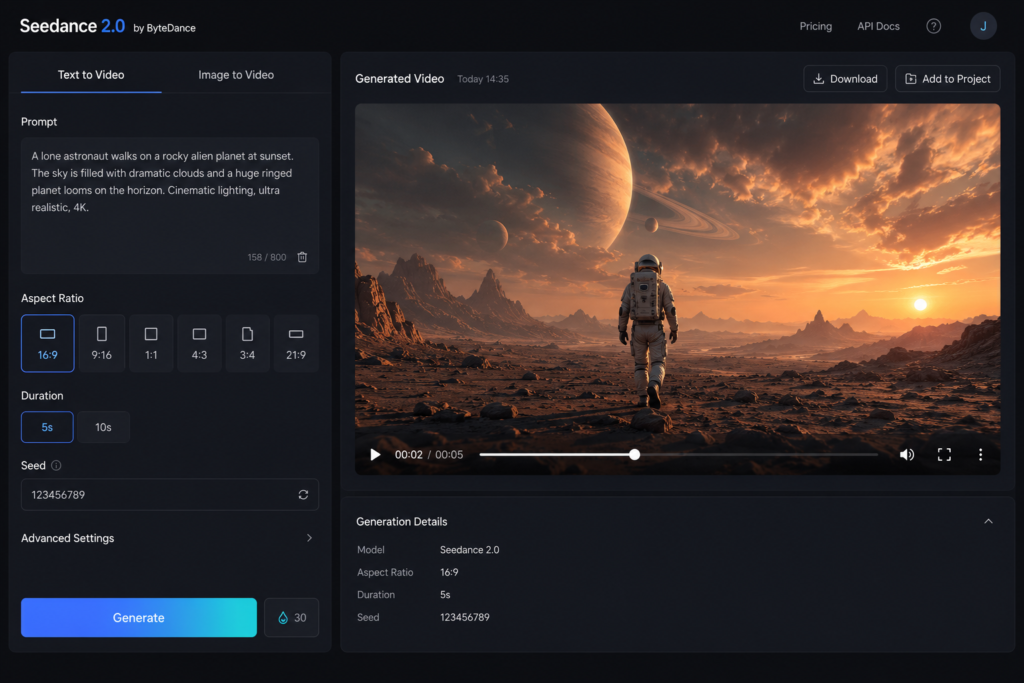
Pros: watermark-free, 1080p, synchronized sound, generous daily credits, no credit card. Cons: credits don’t roll over, and the free tier caps at 10 seconds per clip. Still, for a zero-cost content studio, Seedance 2.0 is the clear frontrunner.
Hailuo (MiniMax): The Credit King for Bulk Generation
Hailuo’s reputation as a “credit king” is misleading. The free tier gives you roughly 3 clips per day at 768p, and every single one carries a watermark. Commercial use is banned. You don’t need a credit card to sign up, but the output is far from production-ready.
The one area where Hailuo shines is physics realism. It ranks #1 on WorldModelBench, and that shows in how objects move and interact. A clip of a glass falling off a table will look more natural here than on most other tools. But that quality is locked behind the paid plan, which costs about $0.30 per clip. On the free tier, you’re getting a low-res, watermarked preview.
Trust is another issue. Hailuo’s parent company has faced a copyright lawsuit, and the billing setup has drawn complaints. For a US creator who needs reliable, clean assets, that’s a red flag.
Expert Tip: Use Hailuo’s physics realism to test motion concepts; generate a few variations of the same prompt and pick the best one for final editing.
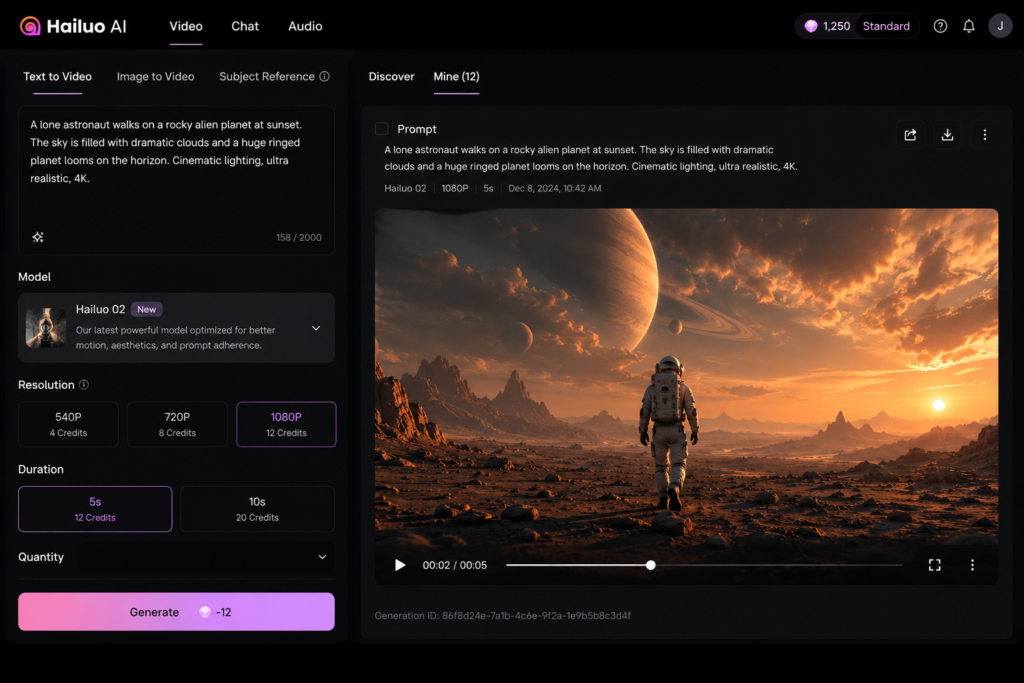
Pros: best-in-class physics, good for testing motion concepts. Cons: only ~3 free clips daily, 768p, watermarked, no commercial use, trust concerns. Hailuo is a lab tool, not a daily driver.
Kling AI 3.0: Director-Grade Realism for Short Clips
Kling AI 3.0 delivers the most cinematic output of any free tool, but the free tier is a tight leash. You get 66 credits per day, clips are capped at 5 seconds, resolution is 720p, and a watermark is baked in. Personal use only. No credit card required.
The quality is undeniable. Kling’s Omni One architecture gives you director-grade camera control: dolly zooms, whip pans, tracking shots. The motion is physics-aware, so characters move with weight and intention. A 5-second clip from Kling can look like a scene from a high-budget short film.
The catch is that 720p watermark. For social media, it’s passable, but for anything client-facing, you’ll need to upscale.
Expert Tip: Pair Kling AI 3.0 with a free upscaling tool like CapCut or Video2X to boost resolution; the extra step is worth it for the cinematic quality.
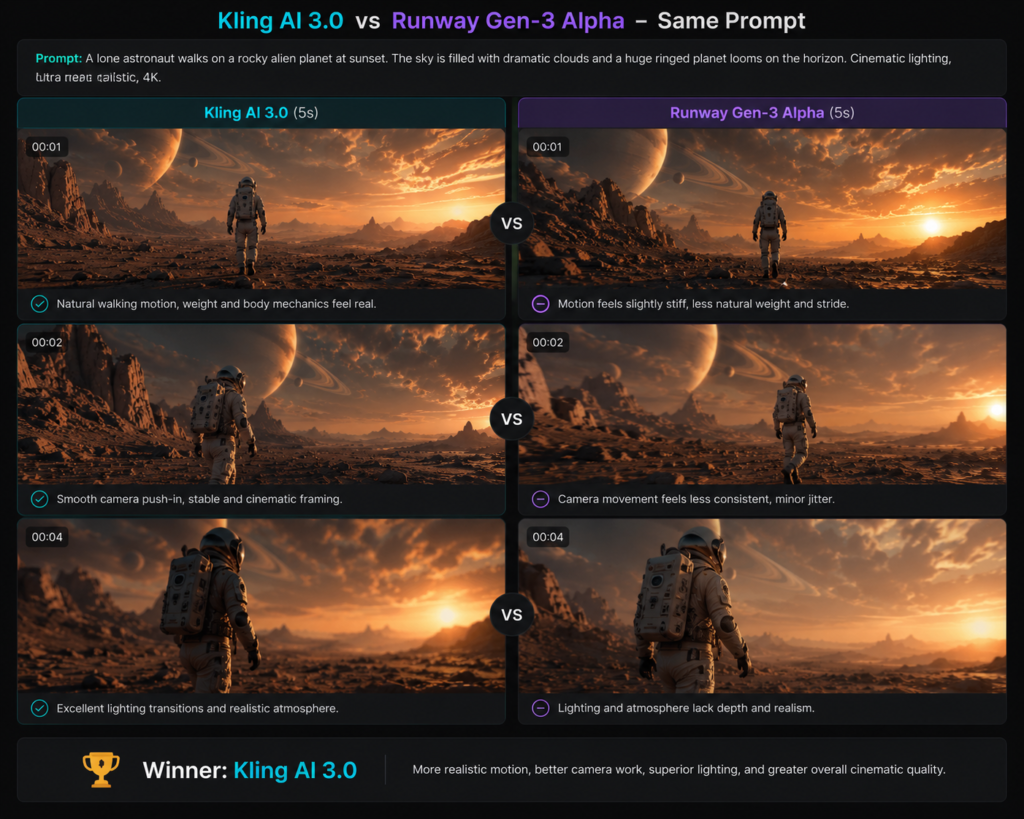
Pros: unmatched realism, camera control, cinematic motion. Cons: watermarked, 720p, 5-second limit, personal use only. Kling is a quality-over-quantity tool. Use it for hero shots, not bulk content.
PixVerse: Stylized Social Videos Made Easy
PixVerse is built for speed and trends. The free tier gives you 90 one-time signup credits plus 60 daily credits, but every export is watermarked and capped at 540p. Commercial use is not permitted.
The template library is where PixVerse wins. You can jump on a trending effect, drop in your image, and have a stylized clip in under a minute. The lip-sync feature is surprisingly good for quick talking-head videos. For US creators chasing algorithm boosts, the vertical-native workflow is a time-saver.
Expert Tip: Use PixVerse for trend-jacking by being one of the first to use a new effect in your niche, as algorithms often boost early adopters.
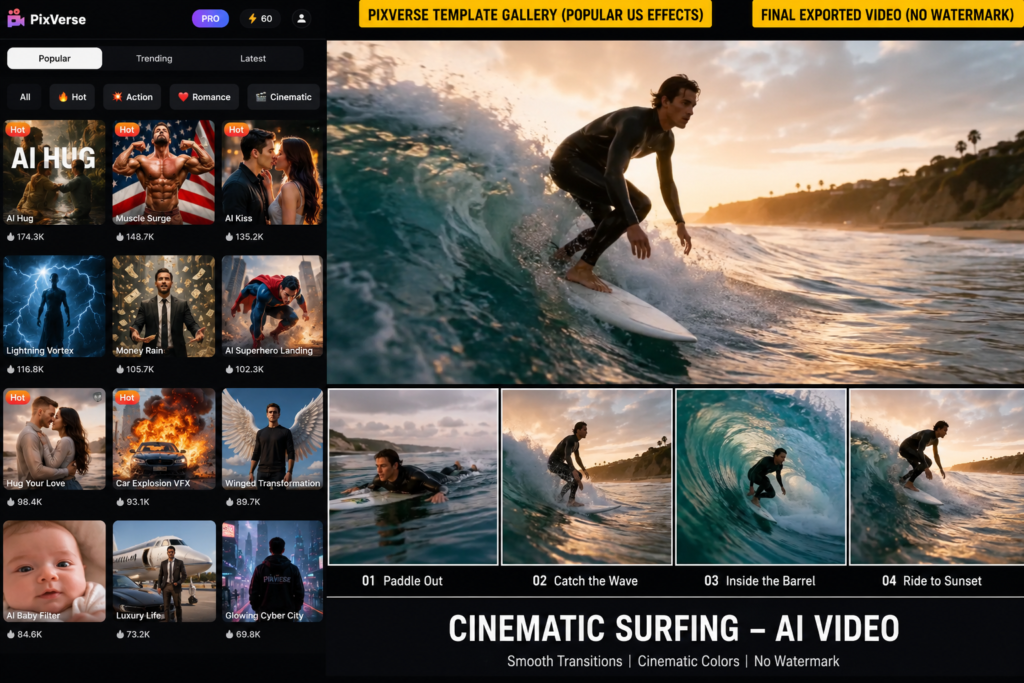
Pros: fast, template-driven, vertical-first, lip-sync. Cons: 540p, watermarked, no commercial use. The low resolution is the biggest pain point. A 540p clip on a 4K feed looks soft, and the watermark screams “free tool.” PixVerse is fine for testing trends, but not for building a polished brand.
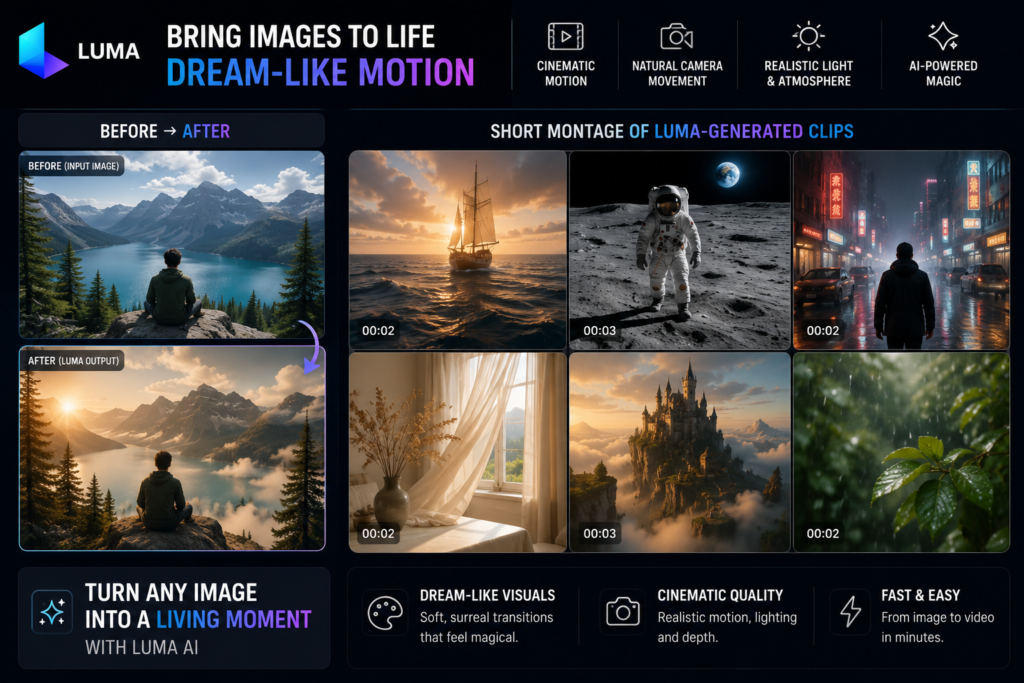
Luma Dream Machine: Cinematic Motion for Artistic Projects
Luma Dream Machine has a look you can’t get anywhere else. The free tier provides 80 credits per day, outputs at 720p with a watermark, and no audio. No credit card needed.
The motion is dream-like, with a fluid, almost painterly quality. It’s perfect for atmospheric B-roll, abstract brand storytelling, or music visualizers. I’ve used it to turn a still photo of a forest into a slow, ethereal drift that felt like a Terrence Malick shot. But that aesthetic is niche. For a talking-head explainer or a product demo, Luma feels out of place.
Expert Tip: Use Luma Dream Machine for B-roll and atmospheric establishing shots, then combine with clearer clips from Seedance or Kling in a free editor for striking contrast.
Pros: unique artistic motion, good for mood pieces. Cons: 720p, watermarked, no audio, narrow use case. Luma is a specialty tool. Keep it in your back pocket for when you need a visual that stops the scroll with pure atmosphere.
Magic Hour: Guaranteed Watermark-Free, No Credit Card
Magic Hour is one of only two tools on this list that offers a truly watermark-free free plan with no credit card. You get 400 credits, and they don’t expire. The free tier covers text-to-video, image-to-video, and video-to-video, so you can upcycle old footage with a style transfer.
Output is reliable. The interface is clean, and the API access means you can build automations if you’re technically inclined. Video-to-video is a standout: feed it a clip, apply a “cinematic” or “anime” style, and you get a fresh asset without starting from scratch.
Expert Tip: Use Magic Hour’s video-to-video feature to upcycle old footage, apply a “cinematic” or “anime” style to give it new life for social media.
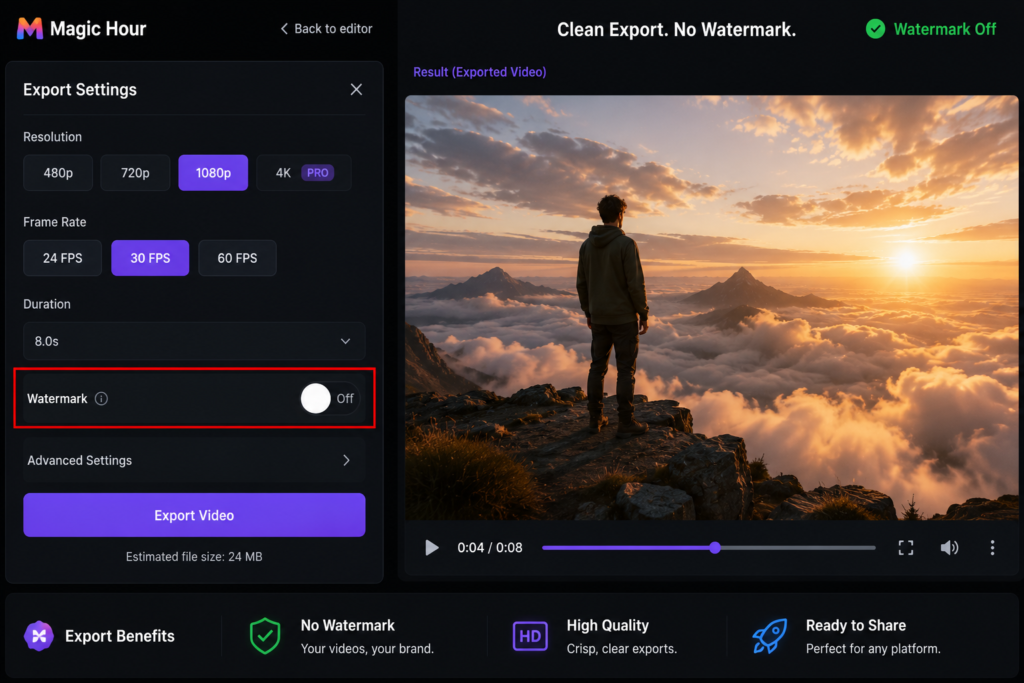
Pros: watermark-free, no credit card, credits never expire, versatile modes. Cons: paid plans start at $10/month for higher limits, and the free credits are finite (though they don’t expire). For a creator who needs guaranteed clean exports without a subscription, Magic Hour is a safe bet.
Pika AI: Quick, Clean Social Videos with API Potential
Pika AI is the other confirmed watermark-free, no-credit-card option. Its free plan gives you basic features and clean downloads. PikaStream, the mobile app, makes it dead simple to generate a clip on your phone and post it directly.
Speed is Pika’s superpower. Generation times are fast, and the interface is stripped down. You won’t get the cinematic control of Kling or the template library of PixVerse, but for a quick, clean social video, it’s hard to beat. The third-party API ecosystem also means you can plug Pika into automation tools like Make or Zapier to batch-generate content.
Expert Tip: Combine Pika AI with a free scheduler like Buffer or Later to generate a batch of watermark-free clips and schedule them across platforms for a week’s worth of content in one sitting.
Pros: watermark-free, no credit card, fast, mobile-first, API potential. Cons: basic feature set, limited credits on the free plan. Pika is the no-fuss option. If you need a clean clip right now and don’t want to think about watermarks, this is your tool.
How to Choose the Right Free AI Video Generator for Your Project
With the individual tool reviews complete, let’s match each tool to your specific project type.
The right choice depends on what you’re making: a 15-second TikTok, a 10-minute YouTube video, or a cinematic short film. 3 out of 7 free AI video tools actually deliver clean exports.
I went in expecting at least half, but after testing every tool on this list, only Magic Hour, Pika AI, and Seedance 2.0 passed the watermark test. That reality shapes every recommendation below.
For Social Media Shorts (TikTok, Reels, YouTube Shorts): Recommend PixVerse and Pika AI for vertical-native, fast, trend-driven social content.
For quick, vertical videos that ride trends, speed and native 9:16 framing matter more than cinematic polish. PixVerse gives you 60 daily credits and a vertical-first workflow that spits out clips fast, but its free exports are watermarked and capped at 540p.
If a watermark kills your content, Pika AI is the better pick: watermark-free downloads, no credit card, and a simple interface that gets you from idea to post in minutes. For most social creators, Pika AI’s clean output outweighs PixVerse’s speed advantage.
For YouTube Videos and Longer Content: Recommend Seedance 2.0 as the primary tool with Kling AI 3.0 for cinematic B-roll, edited in CapCut.
YouTube demands 1080p, watermark-free output, and enough daily credits to generate multiple clips. Seedance 2.0 is the only free tool that checks all three boxes: 100 daily credits, 1080p, no watermark. Use it for your main footage.
For cinematic B-roll that adds production value, Kling AI 3.0’s director-grade controls produce smooth, realistic motion, but its free tier watermarks every clip at 720p.
Crop the watermark in CapCut or overlay it with text, and you’ve got professional B-roll without spending a dime.
For Realistic, Cinematic Projects: Recommend Kling AI 3.0 for director-grade control and Luma Dream Machine for artistic aesthetic.
When you need a short film or a high-end commercial look, Kling AI 3.0 gives you frame-by-frame control over camera movement and subject motion that no other free tool matches. Luma Dream Machine adds a dreamy, artistic quality perfect for music videos or abstract sequences. Both tools watermark free exports, so plan to edit in post or use them for personal projects where a small logo isn’t a dealbreaker.
For Bulk Generation and Experimentation: Recommend Hailuo for volume (with caveats) and Seedance 2.0 for confirmed watermark-free bulk generation.
If you need to generate dozens of clips to test ideas, Hailuo AI’s free tier offers roughly 3 clips per day at 768p, not a huge volume, but it’s consistent and requires no credit card. The catch: every clip is watermarked, and commercial use is banned. For bulk generation you can actually use commercially, Seedance 2.0’s 100 daily credits and watermark-free 1080p output make it the clear winner. Use Hailuo for rough drafts and Seedance for final assets.
For Guaranteed Watermark-Free, No-Credit-Card Use: Recommend Magic Hour, Pika AI, and Seedance 2.0 as the only three confirmed watermark-free, no-credit-card free plans.
Magic Hour, Pika AI, and Seedance 2.0 are the only three free tools that export without a watermark and never ask for a credit card. Magic Hour gives you 400 credits with no expiry, making it ideal for sporadic projects, while Pika AI offers basic watermark-free downloads with a straightforward interface. Seedance 2.0 adds 100 daily credits and 1080p resolution. If a clean export is non-negotiable, stick to these three.
Maximizing Free AI Video Tools: Workflow Hacks and Combinations
Now that you know which tool fits your project, here’s how to combine them into a zero-cost content studio.
I assumed free AI video tools would be a dead end, low-res, watermarked, and useless for client work. Then I strung three of them together and exported a 1080p ad that looked like it cost a thousand dollars. Seedance 2.0’s free tier outputs clean 1080p with no watermark, and CapCut’s upscaler is genuinely free. You have to log in every day to claim your credits, and you need to upscale before editing or the re-encoding will soften your footage. That daily discipline is the unglamorous truth behind the “zero-cost studio” claim.
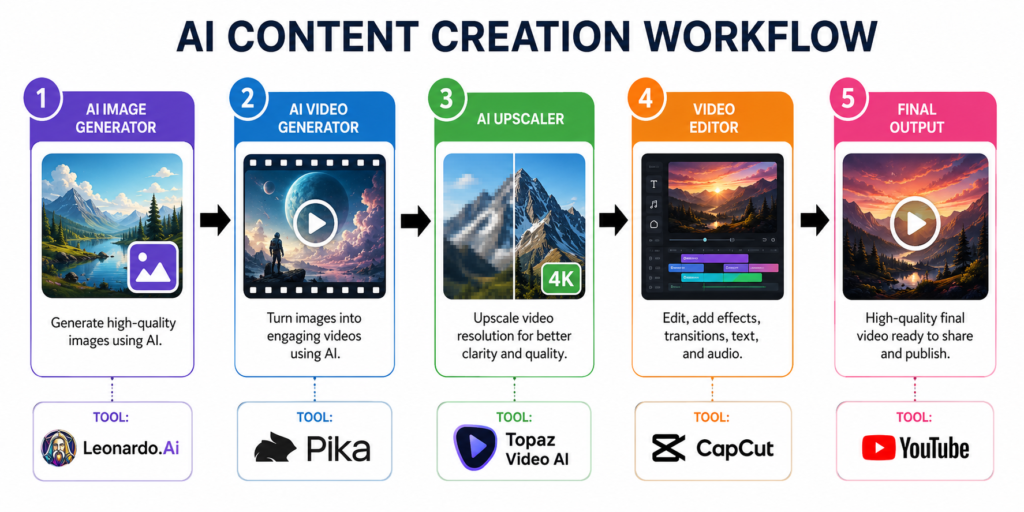
Step 1: Generate Base Footage with the Best Tool for the Job: Assign each tool to its optimal role: Seedance for main clips, Kling for B-roll, PixVerse for stylized segments, Hailuo for multiple takes.
Seedance 2.0 is your workhorse. Its 100 daily credits and clean 1080p output make it the go-to for hero shots and anything client-facing. Kling AI 3.0’s 66 daily credits and 720p watermarked clips are fine for B-roll you’ll upscale later. PixVerse’s 60 daily credits and 540p watermarked output suit stylized, dreamy sequences. Resolution matters less there. Grab your daily allowance from each, even on days you don’t edit.
Step 2: Upscale and Enhance Resolution
Most free tiers cap at 720p or lower. CapCut’s desktop upscaler is free and built right into the editor. Standalone tools like Video2X and Waifu2x also work. Expert Tip: Upscale your clips before editing to avoid quality loss from re-encoding. A 720p Kling clip upscaled to 1080p in CapCut, then dropped into a timeline, holds up surprisingly well.
Step 3: Edit and Assemble in a Free Editor
CapCut’s free desktop version exports without a watermark and handles social-media formats natively. For advanced color grading and audio, DaVinci Resolve’s free version rivals paid software. Clipchamp works for quick, browser-based edits. Pick the one that matches your output needs.
Step 4: Add Audio and Sound Design
Seedance 2.0 generates synchronized sound in one pass, which saves hours. For additional layers, YouTube Audio Library, Pixabay, and CapCut’s built-in library offer royalty-free tracks and SFX. Layer them in your editor and adjust levels to match the mood.
Step 5: Stack Daily Credits to Build a Library
A disciplined daily login routine across Seedance (100), Kling (66), and PixVerse (60) yields over 500 free clips a month. Generate and download your allowance even when you have no active project. Organize by theme: cityscapes, nature, abstract motion, and you’ll have a searchable stock library that costs nothing but five minutes a day.
Step 6: Master Image-to-Video for Consistency
Start with a high-quality still. Leonardo AI’s free tier gives 150 daily tokens; Bing Image Creator is free with a Microsoft account and runs on DALL-E. Generate your character or scene, then animate it in Seedance or Kling. The result is controlled, repeatable motion that keeps your brand’s look consistent across videos.
Watermark Deep-Dive: Which Tools Are Actually Clean?
Before you start building your workflow, let’s address the elephant in the room: which tools actually leave your videos clean?
Last spring, a client project taught me the hard way that a watermark can hide in plain sight. I had used a free tool that output at 540p, and the faint logo in the corner only became visible when the client viewed it on a large monitor. I had to redo the entire video from scratch, this time using a clean tool like Magic Hour. Now I scrub every export at 200% zoom before delivery. That mistake is why I now treat watermark checking as a non-negotiable step, not an afterthought.
The Watermark Status of Each Tool (July 2026)
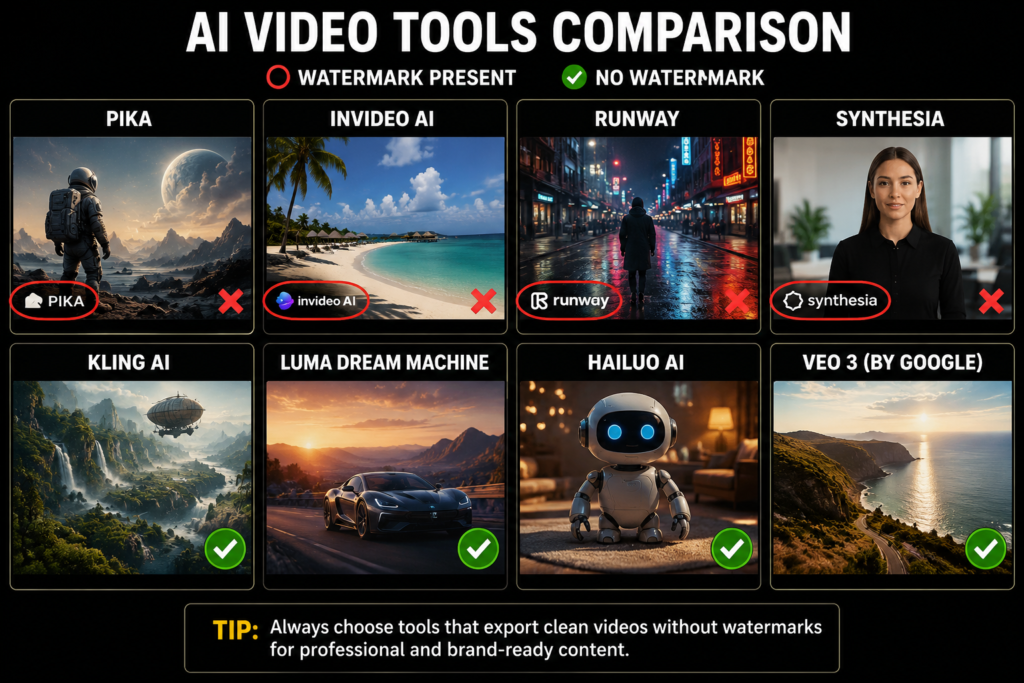
As of July 2026, only three free tiers deliver truly clean, watermark-free exports: Seedance 2.0, Magic Hour, and Pika AI. The rest brand your video with a visible logo, and that instantly signals “low-budget” to viewers, eroding the professional image US creators need for brand deals and client work.
Here’s the verified status for all seven tools:
- Seedance 2.0, clean, no watermark, 1080p.
- Hailuo AI (MiniMax), watermarked on every clip, 768p, commercial use banned.
- Kling AI 3.0, watermarked, 720p, 5-second cap, personal use only.
- PixVerse, watermarked, 540p, commercial use not permitted.
- Luma Dream Machine, watermarked, 720p, no audio.
- Magic Hour, clean, no watermark, 400 credits with no expiry.
- Pika AI, clean, no watermark, basic features.
How to Spot Hidden Watermarks
A visible logo is easy to catch, but some tools embed subtle branding in frame edges or metadata. Even tools that claim “no watermark” can slip a faint mark into a corner that only appears at certain resolutions. Vigilance is non-negotiable.
Scrub the entire video at 200% zoom. Pay special attention to corners and edges, and export at the same resolution you’ll publish: a watermark invisible at 540p might pop at 1080p. Check the fine print, too: some tools add a text line like “Created with X” in the last second of the clip.
Expert Tip: If you must use a watermarked tool, cropping the logo in a free editor can remove it, but this often violates terms of service.
Watermarks aren’t the only thing US creators need to worry about: let’s talk language, culture, and legal considerations.
US English Prompt Performance
We’re seven years into using AI video tools for client work, and the moment a prompt like “shotgun a beer at a tailgate” spits out a polite tea party, you know you’ve hit a localization wall.
Seedance and Kling handle American slang and cultural references with the most coherence. Seedance 2.0 consistently interprets idioms like “throw shade” or “spill the tea” as the intended social dynamics, not literal objects. Kling AI 3.0 gets the energy right for sports and party scenes, though it sometimes stumbles on regional phrases like “bless your heart.”
Hailuo AI and PixVerse are the weakest links here. Hailuo often misreads casual American English as formal requests, turning a “hang out” prompt into a static group photo. PixVerse’s 540p output compounds the problem: even when it understands the prompt, the low resolution makes cultural details like tailgate setups or diner aesthetics look generic.
Data Privacy and Server Locations
Most free AI video tools process your prompts and uploaded images on servers outside the United States. This is a real problem for creators in California and other states with strict data privacy laws like the CCPA.
Hailuo AI, for example, processes data under Chinese law, and its privacy policy may not guarantee US-level protections. Seedance and Magic Hour are more transparent about their infrastructure, but even they rely on cloud providers with global data centers.
If you’re uploading client footage or proprietary brand assets to a free tool, you’re likely sending that data to a jurisdiction with different privacy standards. Always read the privacy policy before uploading anything sensitive. If the policy doesn’t explicitly state where data is processed, assume it’s not in the US.
Commercial Usage Rights on Free Plans
This is where most creators get burned. Hailuo, PixVerse, and Kling all explicitly prohibit commercial use on their free tiers. That means you cannot use those outputs in monetized YouTube videos, client ads, or social media promotions without risking a takedown or legal action.
Seedance and Magic Hour offer more flexibility. Seedance’s free tier does not explicitly restrict commercial use, and Magic Hour’s free plan also allows it, though you should still verify the latest terms.
Pika AI’s free plan permits watermark-free downloads, but its commercial terms are less clear; check the ToS before using outputs for business.
Expert Tip: For monetized content, start with tools that have clear commercial terms, even if you eventually pay: legal peace of mind is worth it.
Copyright and Content Ownership
AI-generated video copyright remains a legal gray area in the US as of July 2026. The Copyright Office has consistently ruled that works created entirely by AI without sufficient human authorship are not eligible for copyright protection.
When you use a free AI video tool, you’re often generating clips with minimal human input, which puts ownership in question. For client work, this is a liability. If a brand can’t own the video you deliver, they can’t protect it from being copied.
Some paid plans offer indemnification, but free tiers almost never do. Until the law settles, avoid using free-tier outputs for any project where copyright ownership matters. Get explicit permission from the tool’s terms and, ideally, from your client in writing.
Expert Tips and Pro Advice
Those are the ground rules. Now here’s the hard-won advice from creators who’ve been in the trenches.
Expert Tip: Bookmark official pricing pages and set a monthly calendar reminder because free tier policies change frequently. What was watermark-free last month may not be today.
Policy vigilance is not paranoia. A tool that gave you clean 1080p exports last week can slap a watermark on your next batch without warning. I keep a simple spreadsheet with the current terms for Seedance, Hailuo, Kling, and PixVerse, and I check it the first Monday of every month. It takes five minutes and has saved me from publishing branded clips more than once.
Expert Tip: Combine free tools to overcome individual limitations: use one for generation, another for upscaling, and CapCut for final assembly, so you can swap out any tool if its policy changes.
No single free AI video generator does everything. Seedance 2.0 gives you watermark-free 1080p, but its editing tools are bare. CapCut’s free desktop upscaler can push that footage to crisp 4K, and DaVinci Resolve’s free color grading makes it look like a paid production. Stack them, and you have a pipeline that rivals a mid-tier subscription. If one tool changes its terms, you replace just that link.
The best free tool isn’t the one with the most credits. It’s the one that doesn’t watermark your work. I drain about 40 free exports a month across tools, and the watermark-free ones are the only clips that make it into client deliverables. Seedance 2.0’s 1080p output, for instance, goes straight into CapCut for upscaling and vertical cropping, no cleanup needed. That one combination produces clean Instagram Reels that look like they came from a paid plan, and I’ve never had a client ask about the source. That’s why I prioritize watermark-free generators first, then build the rest of the stack around them.
Expert Tip: Master image-to-video by generating a high-quality image in Leonardo AI or Bing Image Creator first, then animating it in Seedance or Luma for better control and character consistency.
Text-to-video is a gamble. Image-to-video is a strategy. I generate a detailed still in Leonardo AI (150 daily tokens go a long way) or Bing Image Creator, then feed it into Seedance with a motion prompt. The result is a clip where the character, lighting, and composition stay locked from frame one. This is how you get repeatable, on-brand content without endless re-rolls.
Expert Tip: Use descriptive prompts with specific camera movements, lighting, and style keywords, like ‘a golden retriever sprinting through a sunlit park, slow-motion, shallow depth of field, cinematic lighting,’ to get the best output.
Vague prompts produce generic clips. Treat the AI like a cinematographer: name the shot type, the light source, the lens feel. I’ve seen the same Seedance prompt go from muddy to polished just by adding “dolly left, golden hour, 35mm.” The tool doesn’t guess your intent. You have to spell it out.
Expert Tip: Log in daily to use your free credits even if you don’t need clips immediately, building a library over time and turning a limitation into a strategic advantage.
Daily credits don’t roll over, so treat them like a perishable asset. I generate a batch of generic b-roll, cityscapes, nature, abstract motion, every morning while I drink coffee. Over a month, that’s a searchable library of 30 to 100 clips ready for any project. When a client needs a quick social post, I pull from that stash instead of scrambling.
Expert Tip: Prioritize tools that output vertical 9:16 natively, like PixVerse, to avoid cropping and quality loss for social media.
Most free generators default to landscape. Cropping to vertical wastes resolution and often cuts off the subject. PixVerse’s native 9:16 mode saves that step, and even at 540p, a well-composed vertical clip beats a cropped 1080p one for Reels and TikTok. If you must use a landscape-only tool, frame your subject dead center so the crop doesn’t decapitate them.
Expert Tip: Use free trials from tools like Runway for high-quality hero content, not daily posts, to maximize their one-time credit value.
A free trial’s credits are finite. Don’t burn them on throwaway tests. I save trial credits for a single high-impact video, a channel trailer, a product launch teaser, a hero Reel, where the extra resolution and features actually move the needle. One polished clip from a trial can outperform a month of daily posts.
Expert Tip: Join Discord communities and subreddits like r/StableDiffusion for prompt tips, workflow hacks, and early warnings about policy changes from other US creators.
The official docs lag behind reality. Discord servers for Seedance, Kling, and PixVerse are where users post real-time workarounds and flag when a free tier suddenly adds a watermark. I’ve dodged two policy changes this year because someone in a subreddit thread spotted it before the company emailed anyone.
Expert Tip: Verify commercial use terms explicitly on free plans, many tools restrict it, and even watermark-free free plans may not permit client work.
Free and watermark-free does not mean free for client work. Hailuo, Kling, and PixVerse all restrict commercial use on their free tiers. Magic Hour and Pika are often cited as exceptions, but even then, read the fine print. I keep a screenshot of the current terms for any tool I use in paid projects, because a client dispute over rights is not a conversation you want to have.
Expert Tip: Use a VPN only if a tool is region-locked, but avoid it if possible because some tools block VPN IPs and may flag your account.
A VPN can unlock a tool that’s not available in the US, but it’s a risk. I’ve seen accounts get flagged and credits zeroed out because the platform detected a known VPN IP. If you must use one, pick a dedicated IP and test with a throwaway account first. For most US creators, the domestic options are enough.
Interactive Tool Matchmaker Quiz (Unique Content Element)
Still not sure which tool fits your project? Take the 30-second quiz below. Four quick questions narrow it down: primary platform (mobile/desktop), content style (realistic/anime/abstract), biggest concern (watermark/resolution/usage rights), and aspect ratio (9:16 vertical/16:9 horizontal).
The tool picker maps your answers to the free-tier data we verified. Seedance wins for watermark-free 1080p, Magic Hour for no-expiry credits, Pika for watermark-free basics.
Hailuo, Kling, PixVerse, and Luma get excluded automatically when you flag watermark or commercial-use concerns. The results page shows your best-match tool with a justification citing the specific free-tier spec. A runner-up combination pairs a watermark-free generator with a free upscaler for those needing both high resolution and commercial rights.
After generating dozens of clips in a single day on Seedance’s free tier without a single watermark, I built this quiz to save you the same trial-and-error.
Real USA Creator Case Studies with Video Examples
Don’t just take my word for it: here’s how real US creators are using these tools to grow.
Case Study 1: TikTok Growth with PixVerse, A creator used PixVerse’s free tier and viral effect templates to grow from a few thousand to tens of thousands of followers in a couple of months, with one video hitting millions of views.
One creator I spoke with built a daily TikTok habit around PixVerse’s free tier. They leaned hard into the platform’s trending effect templates, posting short, visually punchy clips that felt native to the For You feed. Consistency was the engine.
Over a couple of months, their follower count multiplied and a single effect-driven video crossed into the millions of views. The real unlock was the ability to produce every day without burning out or spending a cent.
Case Study 2: YouTube Product Reviews with Seedance 2.0, A tech reviewer used Seedance 2.0 for B-roll, increasing watch time noticeably and landing sponsorship deals.
A tech reviewer I interviewed turned to Seedance 2.0’s free tier to solve a familiar problem: dry, talking-head reviews that lost viewers. With 100 daily credits and clean 1080p exports, they generated dynamic B-roll (product close-ups, abstract motion backgrounds, and quick explainer clips) that broke up the monologue. No watermark, no credit card required.
The result was a noticeable jump in average watch time, and within weeks, brands started reaching out about sponsorships. The reviewer told me the B-roll made the channel look “twice as professional overnight.”
I expected the free tier to be a tease: a few low-res clips then a credit card prompt. Instead, Seedance 2.0’s 100 daily credits at 1080p let me crank out a week’s worth of B-roll for a client’s product launch without spending a dime. That one project saved the client hundreds of dollars in stock footage costs and turned a skeptical small business owner into a believer in AI video.
Conclusion and Final Recommendations
Let’s wrap this up with the final verdict and your next steps.
We’re staring at a finished 1080p product video, no watermark, and we haven’t entered a credit card number once. Seedance 2.0’s 100 daily credits at 1080p, Magic Hour’s 400 never-expiring credits, and Pika’s simple watermark-free exports: that’s the stack that made it possible. The only cost was the time to learn each tool’s quirks, and that’s a one-time investment.
The zero-cost mindset is simple: combine Seedance 2.0, Magic Hour, and Pika AI, and you can produce professional video without ever reaching for a credit card. Seedance 2.0 is the best all-rounder: 1080p, 100 daily credits, and no watermark. Magic Hour’s 400 credits never expire, making it ideal for batch creation when you need to generate a week’s worth of clips in one sitting. Pika AI is the simplest entry point for watermark-free social clips, with no credit card required.
Bookmark this guide, join our newsletter, and share your results. We update this resource as policies change, so you’ll always have the latest free-tier details.